Latest / Story
How Do I Pick the Right Control Baseline for My System?
You cannot pick controls until you know how bad a breach would be. That rating decides your baseline, and your baseline decides your control set.
ATO means Authorization to Operate. RMF means Risk Management Framework. AO means Authorizing Official. NIST means National Institute of Standards and Technology. FIPS means Federal Information Processing Standards.
Start with impact, not controls
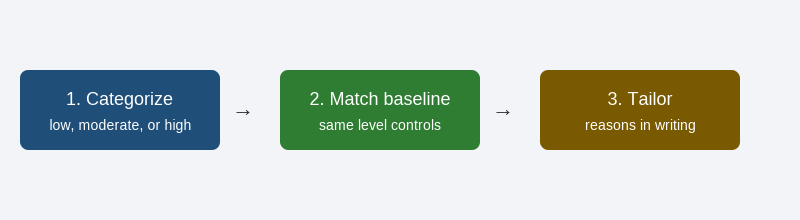
FIPS 199 asks three questions about your system. What happens if confidentiality is lost? What happens if integrity is lost? What happens if availability is lost? Rate each one as low, moderate, or high. The highest rating sets the system level. This rule is called the high water mark. A system with one high rating is a high system.
Match the level to a baseline
NIST SP 800-53B gives three security baselines. Low fits a low system, moderate fits a moderate system. High fits a high system. Each baseline is a starting set of controls. It is not a final answer and not a checklist to skip. There is also a separate privacy baseline. Use it when your system handles personal data.
Tailor with reasons in writing
Tailoring means shaping the baseline to your system. Add controls where your risks demand them. Remove only controls that truly do not apply. Write the reason for every change you make. Put those reasons in the security plan. An undocumented removal looks like a gap. Your authorizing official reads those reasons first.
Common mistakes
- Picking moderate because it feels safe
- Copying another team baseline without the impact rating
- Removing controls with no written reason
- Treating the baseline as the whole package
Sources
- NIST SP 800-53B, Control Baselines for Information Systems and Organizations.
- FIPS Publication 199, Standards for Security Categorization.
- NIST SP 800-37 Revision 2, Risk Management Framework.
- Original diagram by PolicyCortex.
Next step
Want controls tracked against live configuration? See how PolicyCortex checks them.